

Opening or modernising a self-storage centre: who this guide is for
This guide has two kinds of reader. The first has a plot of land, a warehouse or an empty building and wants to turn it into a self-storage centre. The second already operates storage units, sometimes for years, and still spends a good part of every week handing over keys, getting paper contracts signed and ticking off bank transfers in a spreadsheet.
The questions are the same for both. Which sizes to offer. How a customer chooses a unit, signs and pays without making an appointment. How they get in on a Sunday at 21:00. Who does what in the team: the on-site agent, who lets a customer in and checks a vacated unit, and the manager, who oversees everything from the office or from another site. And how a member of the public typing “furniture storage” into their phone finds your centre.
Financing, planning permission and building work depend on your site: you handle them with your architect, your bank and the local council. Here, we are talking about what keeps the centre running day to day, once the units are built. The self-storage: rent, sign, collect direct debits and open online page shows the full journey as it works with ASLOT.
The unit range: which sizes, and how many of each
The range is decided before the plan. It is then adjusted as requests come in to the team.
The need
Meeting real demand around the site. A student going abroad for six months is looking for a small space. A family between two homes needs to store the contents of a house. A plumber stores his equipment and drops by twice a week in his van. A shop stores its end-of-year stock from September. Each has their own size, their own hours and their own way of getting there: on foot with a sack truck, or reversing right up to the door.
The question to ask
“What do the people who live and work around the site need to store?” A centre near a university town, another on the edge of a trading estate and a third in a small town where houses often change hands will not have the same range. If the centre is already running, ask the agent who shows people round which sizes they are asked for and do not have.
The common pitfall
The entire floor area in a single size, because it is simpler to build. Or ten sizes with two units of each. In the first case, the team turns some customers away from the very first month. In the second, nobody can find their way around, neither the customer nor the person answering the phone. A few well-spaced sizes and partitions that can be moved leave room to adjust without major works.
The site plan: the page the customer looks at before renting
A well-made plan is used for building, for renting and for stepping in on site. Designed from the start for these three uses, it never needs redoing.
The need
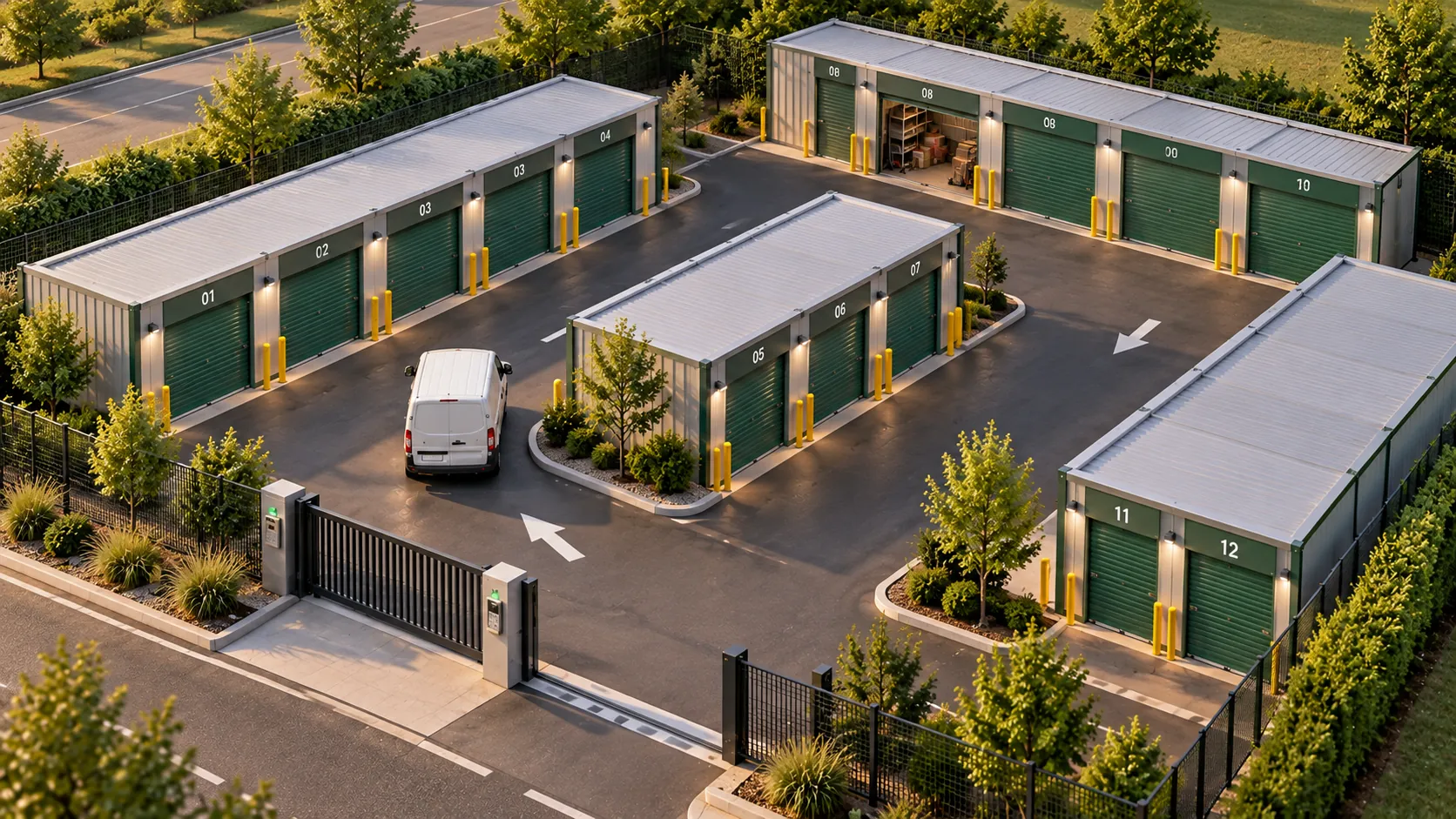
Each unit has a unique number, a size, a location and a price. The plan shows the aisles, the gate, the pedestrian entrances and the places where a vehicle can stop to unload. Online, the customer chooses their unit like a seat on a plane: they see what is free, the size and the price, and take the one that suits them, near the entrance or tucked away at the end of the aisle. The same unit number is then used by the whole team, from the contract to the door.
The question to ask
“If a tenant calls from unit B-14, does anyone in the team know where it is, what they rent and since when, without opening a binder?” Clear numbering, the same everywhere, means you can answer in seconds.
The common pitfall
Different numbering on the paper plan, on the doors and in the spreadsheet. The day two units have the same number, or a rented unit shows as free, it gets rented twice, and the agent spends the morning sorting things out with two customers. With ASLOT, the plan is drawn up during setup and becomes the rental page your customers see, as shown on the online storage unit rental page.
The rental contract: complete, and signed before getting in
The contract says what the customer rents, what they pay, what they can store and how they leave. It is signed before the access code works.
What it contains
- The parties: the operator, the tenant, their contact details and a number where they can be reached.
- The unit: number, size, location on the site.
- Duration: move-in date, minimum term if any, monthly renewal, notice period for leaving.
- Price: monthly rent, options chosen, direct debit date, security deposit if any, price review rule.
- Use: storage of goods only, prohibited items and substances, no living in the unit and no use as a workshop.
- Insurance: the obligation to insure the stored goods, and the cover offered by the centre if the customer wants it.
- Access: hours, personal code not to be shared, reference to the house rules.
- Changing units: what applies when the tenant moves one size up or down.
- Late payment and moving out: what happens if payment is late, unit emptied and left clean on leaving, return of the security deposit.
Cancelling online
If your private customers rent online, they must also be able to cancel online: this is the “3-click” cancellation rule, in force since June 2023. Planned from the outset, it also saves the team from logging letters one by one.
Signature
The contract arrives pre-filled with the rental details, the customer signs it on screen, on their phone or computer, and receives their copy by email. Nobody has to arrange an appointment at the office for a signature, or file a stack of paper in the evening. ASLOT provides a standard contract ready to sign, which you adapt to your terms. Have the final version reviewed by your legal adviser.
Payment: made online, tracked without manual reconciliation
The tenant pays the first month when renting, then the following months are collected automatically. For the team, tracking payments stops being the start-of-month chore.
The need
The customer pays the first month online, at the time of renting, before receiving their code. The following months are collected by SEPA direct debit on the date set in the contract, with no bank details to copy out and no paper mandate to scan. Options chosen, such as insurance, are added to the same payment. The tenant receives their receipt, and the manager sees at a glance where each contract stands.
The question to ask
“What happens, and who does what, when a direct debit fails on the 5th of the month?” In a well-run centre, the tenant is notified tactfully, settles up online, and everything returns to normal as soon as that is done. The team has no awkward phone calls to make. The direct debits and late payments page shows what the manager sees at each stage.
The common pitfall
Accepting manual bank transfers and cheques at the start of the month because the first customers ask for it. By the thirtieth unit, reconciling payments takes up the start of every month, often for the person who should be on site welcoming new tenants.
Site access: one code per customer, valid for as long as the contract runs
Access is the moment the rental becomes real. The customer gets to the gate with their boxes, and the gate opens.
The need
One personal code per tenant, sent by SMS as soon as the contract is signed and the first payment made, valid for as long as the contract runs. No keys to hand over, no appointments to arrange. Access hours are the ones you set, 24/7 or time windows wider than your staffed hours, and you can adapt them to the season. Every entry is recorded in the history, which the agent and the manager check from the office or from their phone. The access control for self-storage page details what the tenant sees.
The question to ask
“Can my current gate and doors be controlled by the system, or do they need replacing?” A lot of existing equipment can be kept. This is checked with you, before any hardware is ordered.
The common pitfall
A single code for the whole site, changed every now and then. A former customer still knows it, a removal firm has written it down, and the day you need to know who came in on Tuesday evening, nobody can say. To open at any hour while staying in control, the 24/7 self-storage centre: security and access guide reviews lighting, cameras and alarms.
Details on personal codes, the gate and night-time lighting are in the 24/7 self-storage centre: security and access article.

Insurance: protecting the site, offering cover to the customer
Two types of insurance meet in a self-storage centre. The operator’s insurance covers the site and its liability. Insurance for the stored goods is the customer’s concern.
The need
The contract requires the customer to insure what they store. Many think their home insurance is enough, which depends on their policy and rarely matches what they imagine. Offering cover at the time of rental, with a declared value chosen by the customer, settles the matter with a tick box. The tenant leaves covered, and the agent has no certificates to chase one by one.
The question to ask
“Who holds the insurance contract I offer, and what is my role in distributing it?” The framework is checked with the insurer or broker providing the contract, before the option is shown on your rental page.
The common pitfall
Offering nothing and relying on a clause in the contract. The day there is water damage, the customer discovers their belongings were not covered, and it is you they turn to. Another common oversight: not telling your own insurer that the site is open at all hours, with cameras and access control.
Online visibility: being found, then renting at any hour
People look for a unit near home, often in the rush of a move, and often in the evening. Your centre needs to appear, and it needs to be possible to rent at the very moment of the search.
Being found
A complete business profile on online maps, with the exact address, access hours, real photos of the site and a direct link to the rental page. A website that names the town, the neighbouring towns and villages, the sizes offered and the uses: moving house, building work, business stock, archives. Reviews from tenants, which someone on the team replies to.
Renting at the moment of the search
The customer who finds your centre on a Sunday at 22:00 won’t necessarily wait until Monday to call back. If the plan, the prices and online rental are on your website, they choose their unit, sign, pay and receive their code straight away, at their own pace. On Monday morning, the team finds a rental already done instead of a message to return. The booking module fits into the website you already have, in your colours. The online storage unit booking page follows this journey step by step, from your side.
Displaying your prices
Visible prices reassure customers and spare the team calls that are only about asking for a price. To build a price list that is clear and simple to apply, the storage unit rental prices: building your price list guide gives the method, size by size.
Monitoring and the team: who sees what, from the site to the office
A self-storage centre is monitored with a few simple indicators, and organised around two roles that work together.
The on-site agent and the manager
The agent or operator on site shows people round, recommends a size, lets in a customer who has a problem, checks a vacated unit and receives alerts for their site on their phone. They get in with their own access, during their own hours. The manager, at the office or at head office, sees everything: contracts, occupancy, settings, and several sites if you have more than one. Information passes from one to the other without paper or phone calls: the agent sees the rental signed the previous evening, the manager sees the day’s comings and goings and alerts.
What to monitor
- Occupancy, overall and by size: it tells you which size is in short supply and which stays empty.
- Move-ins and move-outs for the month: new contracts, cancellations, unit changes.
- Length of occupancy, useful for anticipating which units will become free.
- Outstanding payments, few and far between once direct debit is in place, to be followed up tactfully.
- Comings and goings on site, hour by hour, useful when a tenant has a question or an alarm goes off.
Accounting, e-invoicing and multiple sites
Payments flow into your accounts without being keyed in again. The e-invoicing reform also applies to self-storage centres: all businesses have had to be able to receive electronic invoices since 1 September 2026, and SMEs and micro-businesses will have to issue them from 1 September 2027, according to the timetable published by the French tax authorities. Rentals to private individuals fall under a separate reporting process, e-reporting. ASLOT is e-invoicing compatible. A second centre, or containers on another plot, can be added to the same account, and each agent sees the sites that concern them. The storage centre management page shows how events across a portfolio of sites are followed, entries and alerts included. As for pricing: €1 excl. VAT per unit per month, with a minimum of €59 excl. VAT per month and a sliding scale from 100 units.
Preparing to open a self-storage centre in five steps
- Define the range
List the likely customers around the site, look at what nearby centres offer and settle on a few well-spaced sizes, with movable partitions so you can adjust later.
- Draw and number the site plan
A unique number for each unit, the same on the door, on the plan and in the software, with the aisles, the gate and the unloading areas.
- Write the contract and the house rules
Start from the standard contract, add your terms on price, duration, use, changing units and moving out, provide for online cancellation and have the whole thing reviewed.
- Set up online rental and access
Online plan with prices, options including the insurance offered, on-screen signature, first month paid online then monthly direct debit, personal code sent by SMS.
- Assign roles, open, adjust
Give each agent their own access and hours and the manager the overall view, then adjust the range, prices and access hours based on actual occupancy.
Before opening: a 12-point checklist
- The unit sizes match the people who live and work around the site.
- Each unit has a unique number, the same on the door, on the plan and in the software.
- The online plan shows available units, their size and their price.
- The contract specifies use, prohibited items, changing units and moving out.
- Online cancellation is in place for private customers.
- The contract is signed on screen and the copy is sent by email.
- The first month is paid online, the following ones by SEPA direct debit.
- Each customer receives a personal code, valid for the duration of their contract.
- The existing gate and doors were checked before any hardware was ordered.
- Insurance for stored goods is offered at the time of rental.
- Each agent has their own access during their own hours, and the manager has the overall view.
- The business profile and your website link to online rental.
Your questions
How is the team organised when you open a self-storage centre?
Around two roles. The on-site agent shows people round, recommends a size, lets in a customer who has a problem and checks units that have been vacated. The manager oversees contracts, occupancy and settings, for one site or several. Renting, signing and payment happen online, which leaves everyone time for tenants and for looking after the site.
Can you modernise an existing centre without losing your current tenants?
Yes. Existing tenants are carried over with their unit, their price and their payment date. They switch to direct debit and receive their personal code as the changeover progresses, which you schedule with your project manager during setup. New customers rent online from day one.
What unit sizes should you offer to start with?
The ones people around your site ask for, and that varies a lot from one location to another. Start with a few well-spaced sizes with movable partitions, then look at occupancy by size after a few months: a size that is full tells you there are not enough, a size that stays empty tells you there are too many.
Does the customer need to install an app to rent or get in?
No. Renting, signing and payment go through the browser, on a phone or computer. The access code arrives by SMS. There is nothing to download.
How much does software to manage a self-storage centre cost?
ASLOT costs €1 excl. VAT per unit per month, with a minimum of €59 excl. VAT per month and a sliding scale from 100 units. Online rental, contracts, direct debits and access are included. Setup is a turnkey flat fee, quoted during the demo.
Can containers placed on a plot of land be rented in the same way?
Yes. A container is rented like a unit: it is chosen online, signed for and paid for, and the customer receives their code for the gate of the plot. The container site is managed from the same account as the indoor centre.
Can a tenant change unit during the rental?
Yes, and it happens often: one size up when belongings start to overflow, one size down after a clear-out. The agent or the manager assigns the new unit, the contract and the price follow, and the tenant keeps their access to the site with nothing else to do.
Official references
Read next
See your self-storage centre online
A free 30-minute demo to go through online rental, the contract, access, and what the on-site agent and the manager see.